We start the final project today: a system of your own design, with at least two sensors and two actuators, that your phone can talk to over Bluetooth.
In the reading we introduced Bluetooth Low Energy: what BLE is for, how a peripheral and a central find each other (GAP, the Generic Access Profile), how they exchange data once connected (GATT, the Generic Attribute Profile), and how the Bluefruit module turns all of that into a serial connection.
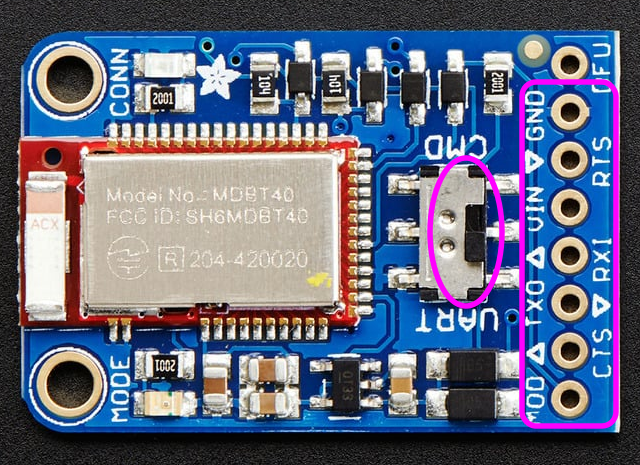
In the reading we introduced the Bluefruit module as a UART bridge. On our board, the bridge runs through USART1: the STM32C031C6 has two USARTs, and USART2 is already carrying printf to CoolTerm through the ST-LINK, so we’ll use USART1 to connect the Bluefruit module to the Nucleo. We’ll also be using hardware-based flow control.
Hardware flow control adds two extra wires that carry each side’s ready-or-not state, so that neither side sends data faster than the other can take it in. CTS (clear to send) is the input signal that allows a device to transmit: the reference manual (RM0490 §24.5.20) says that with flow control enabled, the transmitter checks its CTS input before sending each frame, and while that input is high it waits; the frame goes out once CTS is low again. RTS (request to send) is the same signal from the other side’s point of view: a device holds its RTS output low while it is ready to receive, and raises it when it is not. The two wires cross: the Nucleo’s RTS output drives the Bluefruit’s CTS input, and the Bluefruit’s RTS output drives the Nucleo’s CTS input. On the Bluefruit there is nothing to enable: its CTS gate is always in effect, and the module ships with that pin pulled high, so a module whose CTS is not wired will not transmit. On our side the gate exists only once flow control is enabled: a USART with flow control enabled and its CTS input accidentally left unconnected can stop transmitting entirely, with no error appearing anywhere.
Read the details of USART1 in the reference manual (RM0490 §24.5.20) to understand how to enable this feature. Once you understand how to enable it, examine the alternate function mapping tables in the STM32C031C6 datasheet (Tables 13 through 18, Port x alternate function mapping), which list which pins can carry each of the four USART1 signals. You will need to decide which physical pins you will use for the four USART1 signals.
Activity15.2.1.Complete your table: the Bluefruit connections.
Fill in the table below: for each of the four USART1 signals, the port and pin you chose, its alternate function number, and the pin on the Bluefruit you’ll connect it to.
Two operating modes, selected by the little switch: in command mode (CMD) the module listens for AT commands, and in data mode (UART) it streams raw data.
We’ll also be using hardware-based flow control: read the details of USART1 in the Reference Manual (RM0490 §24.5.20) to understand how to enable this feature.
Once you understand how to enable it, examine the alternate function mappings in the STM32C031 datasheet (Tables 13 through 18). You will need to decide which physical pins you will use for the four USART1 signals.
Hardware flow control adds two extra wires that carry each side’s ready-or-not state, so that neither side sends data faster than the other can take it in.
CTS (clear to send) is the input signal that allows a device to transmit: with flow control enabled, the transmitter checks its CTS input before sending each frame, and while the input is high it waits. The frame goes out once CTS is low again.
RTS (request to send) is the same signal from the other side’s point of view: a device holds its RTS output low while it is ready to receive, and raises it when it is not.