Your display is currently showing four characters that we chose when writing the helloDisplay.c program. Next we’ll put your own character there. The only thing you need first is what a byte of display_buffer means.
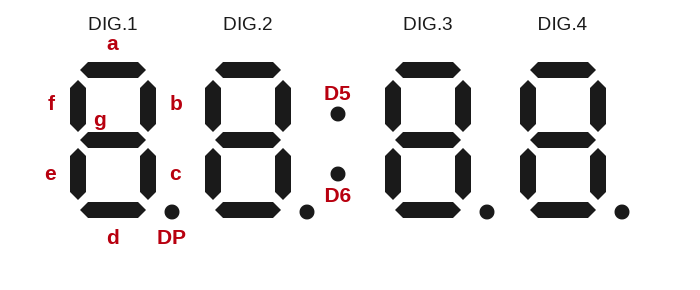
Each digit consists of seven bar-shaped LEDs and a round one, and they have names: a at the top, then b and c down the right, d along the bottom, e and f up the left, g across the middle, and DP for the decimal point (Figure 10.1.22). Those are the names the HT16K33 datasheet uses, and they are the order the bits are in: bit 0 is a, bit 1 is b, on up to bit 6 for g, and bit 7 is the decimal point. Written as a binary literal a digit’s byte therefore reads 0b DP g f e d c b a, most significant bit first, which is why the H in the helloDisplay.c program is 0b01110110: bits 1, 2, 4, 5 and 6, so b c e f g.
Figure10.1.22.The four digits with every segment drawn, and the segment names on the first one: a across the top, b and c down the right side, d across the bottom, e and f up the left side, g across the middle, and DP for the decimal point. The colon between digits 2 and 3 is two more LEDs, called D5 and D6 here.
Ten bytes, two per position. display_buffer[0] is the first digit, [2] the second, [4] the colon, [6] the third and [8] the fourth; the odd-numbered entries are the ones that stay 0, and we’ll find out on Thursday why they cannot simply be left out. Everything you change today is one entry of this array.
Work out the byte for an E: which segments are lit, which bits are those, and what is the binary number? Put it in display_buffer[0], build, flash, and check that the first digit indeed shows an E.
An E is a, d, e, f and g, bits 0, 3, 4, 5 and 6, so the byte is 0b01111001. A decimal point after the second digit means setting bit 7 of display_buffer[2]. And the odd entry: the display RAM does have an address there and the byte does land in it, but on a seven-segment digit nothing is wired to the LEDs it would drive, so the character disappears rather than appearing somewhere unexpected. We’ll see why when we look at the display RAM map on Thursday.
Each digit is seven bar-shaped LEDs and a round one, and they have names: a across the top, b and c down the right, d along the bottom, e and f up the left, g across the middle, DP for the decimal point.
Those names are the order the bits are in: bit 0 is a, up to bit 6 for g, and bit 7 is the decimal point. So a binary literal reads 0b DP g f e d c b a, most significant first.