Registers are half the story; the debugger watches your C variables just as easily, in the Variables tab of the same right-hand pane. The program is Day 5’s keyboard-controlled counter, whose receive path polls the RXNE (receive data register not empty) flag and reads the character register only when a byte has arrived:
while (1) {
    if (USART2->ISR & USART_ISR_RXNE_RXFNE) {
        char key = USART2->RDR & 0xFF;      // <-- breakpoint goes here
        if      (key == 'u' || key == 'U') count++;
        else if (key == 'd' || key == 'D') count--;
        else if (key == 'r' || key == 'R') count = 0;
    }
    printf("count = %d\r\n", count);
    delay_ms(500);
}
A breakpoint on the marked line is useful because that line is reached only when the RXNE test succeeds. So the program runs free, printing count twice a second, until the moment a key is pressed in CoolTerm, and then it halts with the fresh byte one step away. A breakpoint placed inside an if means break when this happens.
Activity7.1.8.Predict the Value, Then Press the Key.
(a)
Terminate the Blinky session (red square), open your keyboard-counter project from Day 5, and launch it under the debugger. Open CoolTerm as usual, set a breakpoint on the marked line, and click Resume. The counter prints away, and the breakpoint waits.
Before pressing anything: predict the decimal value the variable key will hold after the marked line executes when you press u. Anchor: 'a' is 97, and the lowercase letters run in order.
Now press u in CoolTerm. The program halts at the breakpoint; click Step Over once to execute the read, and check key in the Variables tab against your prediction. Then find USART_RDR in the SFRs view.
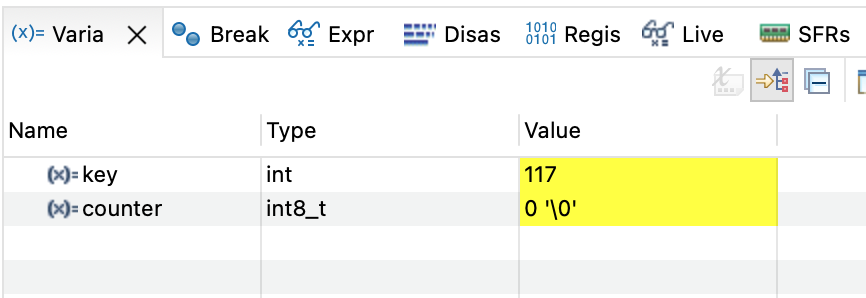
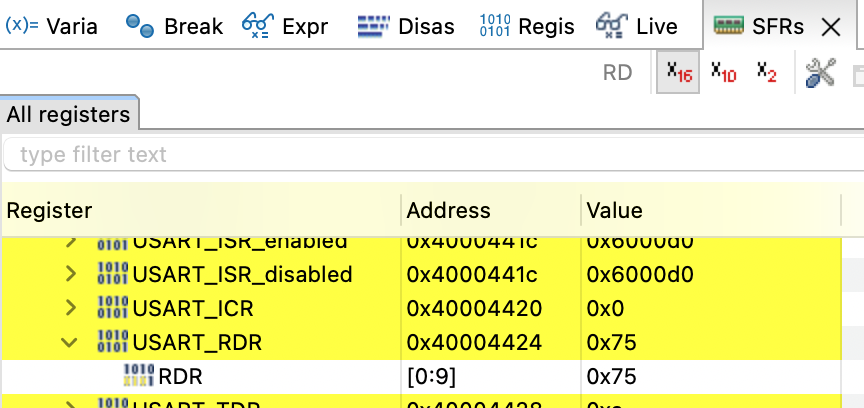
What you’ll see on screen: after the keypress lands and one Step Over executes the read, the Variables tab shows key holding 117, and the SFRs view shows USART_RDR holding 0x75 (Figure 7.1.14). Same byte, three names: the character 'u', the decimal 117, the hex 0x75. The Variables tab shows you that byte as your C code sees it, and the SFRs tab shows the same byte in the peripheral register it arrived in.
Figure7.1.14.The same keypress in two views. Left: the Variables tab after stepping the read, key holds 117 (this capture is from a counter variant whose key is an int and whose count is an int8_t named counter; the values, not the names or types, are the point). Both rows glow yellow here (the debugger has just refreshed them), so read the values, not the colors: key is the one that changed. Right: USART2’s receive data register USART_RDR in the SFRs view holds 0x75. 117 and 0x75 are the same number, the ASCII code for 'u'.